
Android & macOS support for in-session passwordless authentication (Preview)
Microsoft added in‑session passwordless authentication to the Azure Virtual Desktop (short AVD) Windows App on macOS and Android. Both features are currently in preview. In July 2026 Android gained preview support for in‑session Web Authentication (short WebAuthn) using passkeys stored on an Android device through a (software-based) passkey provider like Microsoft Authenticator (and Android External Identities reached general availability). In August 2026 macOS received preview support that includes both software-based passkeys and connected hardware keys. Below I’ll walk through what changed, why it matters, what each preview supports (and doesn’t), and exactly what to do to pilot the features safely.
IMPORTANT: This feature is in PREVIEW. Read the Supplemental terms for Microsoft Azure Previews before you test the feature in a productive environment.
The problem today
When an app inside an AVD session requests re‑authentication or triggers a WebAuthn prompt on an Android- or macOS device, users traditionally type credentials into the remote session or use their MFA options. That’s clumsy and risky. Passwords typed inside a remote session increase user friction and expand the attack surface (clipboard risks, guest‑side keyloggers, accidental disclosure). What we want is for the client device, where the user already stores his passkeys or his Microsoft authenticator, to handle the WebAuthn flow and return the assertion to the remote app without exposing typed secrets inside the session.
For enterprises this lowers risk and improves UX for mobile and Mac users who expect passwordless authentication flows. It also extends AVD’s modern authentication surface beyond Windows clients.
What changed
Microsoft now lets the Windows App forward in‑session WebAuthn challenges to the client platform, so the user can complete them with local passkeys. The practical differences by client are:
- Android (July 2026)
- In‑session WebAuthn works with passkeys stored on the same Android device via a software passkey provider (for example, Microsoft Authenticator).
- macOS (August 2026)
- In‑session WebAuthn works with passkeys stored on the Mac and with passkeys exposed by connected hardware security keys or supported QR pairing flows.
- Android External Identities (July 2026)
- Separately, Android support for External Identities is now generally available. This improves sign‑in federation scenarios on the Android Windows App and is distinct from the in‑session WebAuthn capability.
What’s supported in the previews
- Android
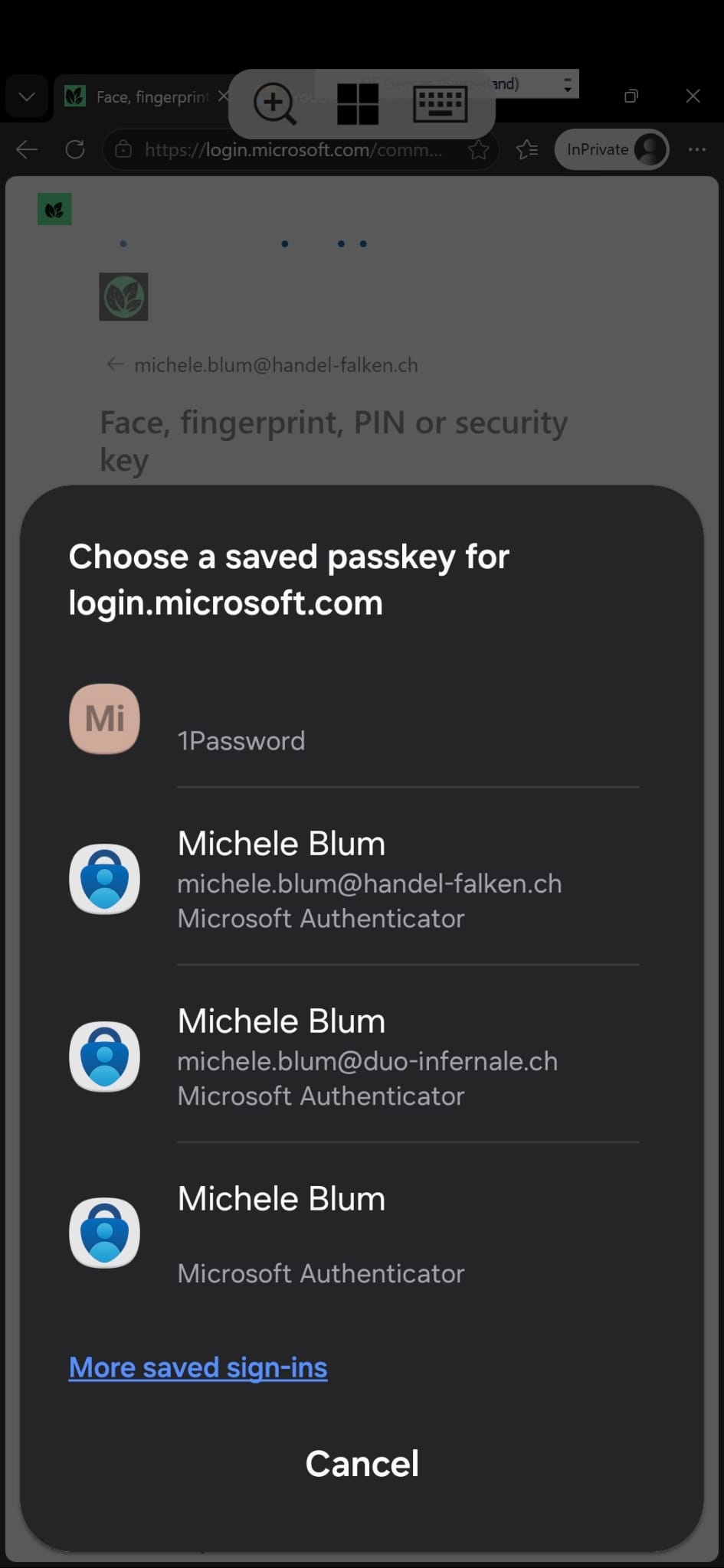
- Supported: software passkeys stored on the same Android device (via supported passkey providers). For example: Microsoft Authenticator or 1Password (like in the screenshot above).
- Not supported: external hardware keys and QR pairing for remote passkey use. For example: a FIDO-key like the ones from Token2.
- macOS
- Supported: macOS‑resident passkeys and passkeys from connected hardware security keys or supported QR flows.
General notes
- Both features are preview and may change.
- The Windows App must be on a client build that includes the in‑session WebAuthn forwarding support (latest).
- Entra ID must allow passkeys / WebAuthn for users.
What’s not supported / limitations
- Android preview only accepts device‑resident software passkeys. External device keys and QR pairing aren’t supported yet.
- Feature parity between platforms is not guaranteed during preview.
- Telemetry and logging for preview features can be incomplete.
- Conditional Access or custom policies may affect the authentication flow.
How to test the feature
- Confirm requirements
- Ensure Entra ID passwordless settings are enabled for test users.
- Update test clients
- Update the Windows App build to the latest version on Android and macOS test devices.
- On Android, install Microsoft Authenticator or another supported software passkey provider and register a passkey.
- On macOS, register a macOS passkey or have a compatible external security key available.
- Trigger an in‑session WebAuthn flow
- Launch a remote session or published app that triggers a WebAuthn prompt (a web app requiring re‑auth is a good test).
- Confirm the passkey prompt appears on the client OS (not a typed box in the remote session) and complete the assertion.
- Validate logging and policy behaviour
- Check Entra ID sign‑in logs.
- Verify Conditional Access evaluation and expected application behaviour.
Conclusion
In‑session passwordless on Android and macOS is a useful advancement for AVD. It shifts WebAuthn prompts out of the remote session and onto the client device, improving security and UX. Android’s July preview gives you support for device‑resident software passkeys. macOS’s August preview adds broader hardware key support. Treat both features as previews: pilot in non‑production, validate Entra ID authentication methods and Conditional Access behaviour, and wait for broader Android parity and full GA rollout before moving both features to production.