
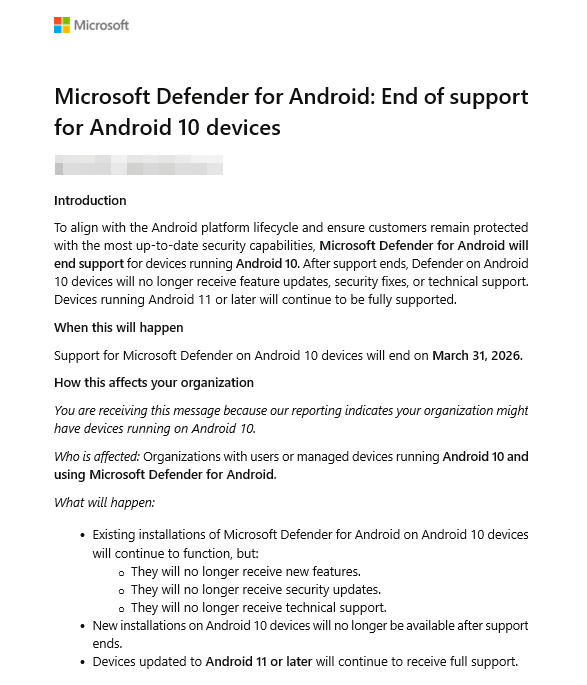
Microsoft has announced two important upcoming changes to Microsoft Defender for Android. First, support for Microsoft Defender on Android 10 devices will end on the 31st March 2026. Second, Microsoft will retire Defender support for protecting personal profiles on enrolled devices by the end of March 2026.
Once these changes take effect, Defender on Android 10 devices and Defender deployed within personal profiles on enrolled devices will no longer receive new features, security updates, or technical support. Work profiles and unenrolled devices remain fully supported (Android 11 and later).
Update Overview
Microsoft Defender for Android plays a key role in protecting mobile device users from malware, phishing, and other mobile threats. To keep pace with modern Android security standards, Microsoft is retiring support for two scenarios:
- Devices running Android 10 (later Versions are not supported anymore since last year’s January).
- Defender deployed in personal profiles on enrolled devices.
Android 10 is now an older OS version that no longer meets Microsoft’s minimum security requirements. Meanwhile, personal profile support on enrolled devices creates complexity with limited enterprise security benefit, since Android already provides strong profile isolation between work and personal environments. These decisions to retire those features aim to strengthen enterprise data protection while maintaining platform‑aligned privacy, security, and lifecycle practices.
What happens after March 2026:
- Defender on Android 10 will still run but will not receive updates or support.
- Defender will no longer protect personal profiles on enrolled devices. Only work profiles will be managed and secured.
- Defender on Android 11 (and later) work profiles and unenrolled devices (not enrolled via Intune) scenarios will continue as normal.
Recommended Actions For Administrators
Although Microsoft has said that no direct administrative action is required, organizations should still assess their mobile device landscape.
The first step is to identify any devices still running Android 10. Using Intune or your existing MDM solution, generate a report of devices on unsupported OS versions. These devices will continue to function after the 31st of March 2026, but Defender will stop receiving security updates and feature improvements. Whenever possible, encourage users to upgrade to Android 11 or later. If devices cannot be upgraded due to manufacturer limitations or hardware age, consider planning for replacement to maintain security and compliance.
What Is Changing For Personal Profiles? (MC1221927)
In addition to the OS retirement, administrators should also prepare for the retirement of Defender support within personal profiles on enrolled devices. After March 2026, Microsoft Defender will focus solely on protecting the work profile. Personal profiles will no longer receive Defender protection, updates, or support. This change does not affect work profiles or unenrolled devices using MAM policies. In my opinion, this is a good moment to fully separate work and private devices and rely on mobile application management for protecting corporate data on personal devices.
Benefits Of These Changes
These retirements offer several clear benefits for organizations and users. Ensuring Defender runs only on supported Android versions keeps devices protected with the latest security updates and capabilities. Removing support for personal profile protection also reinforces a clear separation between corporate and personal environments, improving privacy while keeping the focus on securing work data.
Conclusion
These upcoming retirements mark Microsoft’s effort to maintain strong and modern mobile device security. Organizations should take time to identify Android 10 devices and evaluate device upgrade paths, and be aware that Defender protection within personal profiles on enrolled devices will end by March 2026. Preparing early (as always) ensures a smooth transition and helps maintain a secure, compliant mobile device environment in your tenant.