
Azure Virtual Desktop: Now Available in Your Region
Regional host pools for Azure Virtual Desktop (short AVD) are now generally available (short GA) since the end of September 2026. You no longer need to opt in to a preview. Regional host pools can be created in supported regions (GA launched in East US 2 and Central US) via the Azure portal or PowerShell. Microsoft is rolling regional infrastructure to more regions in phases and is delivering a migration service to move existing geographical host pools to regional over time.
Back in January 2026 I covered regional host pools when they were in public preview. Now that the feature is GA and several things have changed, below I’ll walk you through what’s new and how to validate and deploy it.
Why this matters
The core problem hasn’t changed since preview. Historically AVD stored host‑pool metadata in geography‑level databases that could back multiple regions. Even though those databases had replication and paired‑region failover, an issue in the region hosting the geography database could still affect host pools in other regions.
Regional host pools move that metadata into the region you pick. The practical result is smaller blast radiuses during incidents and better alignment with data‑residency requirements.
What changed since the preview
Back in January 2026 the experience required a subscription‑level preview opt‑in and, at first, you could only deploy Regional host pools via PowerShell. You had to register the preview feature and install the Az.DesktopVirtualization 5.4.5‑preview module to create regional host pools. Those historical steps and my full preview walkthrough are preserved in my January 2026 post for context.
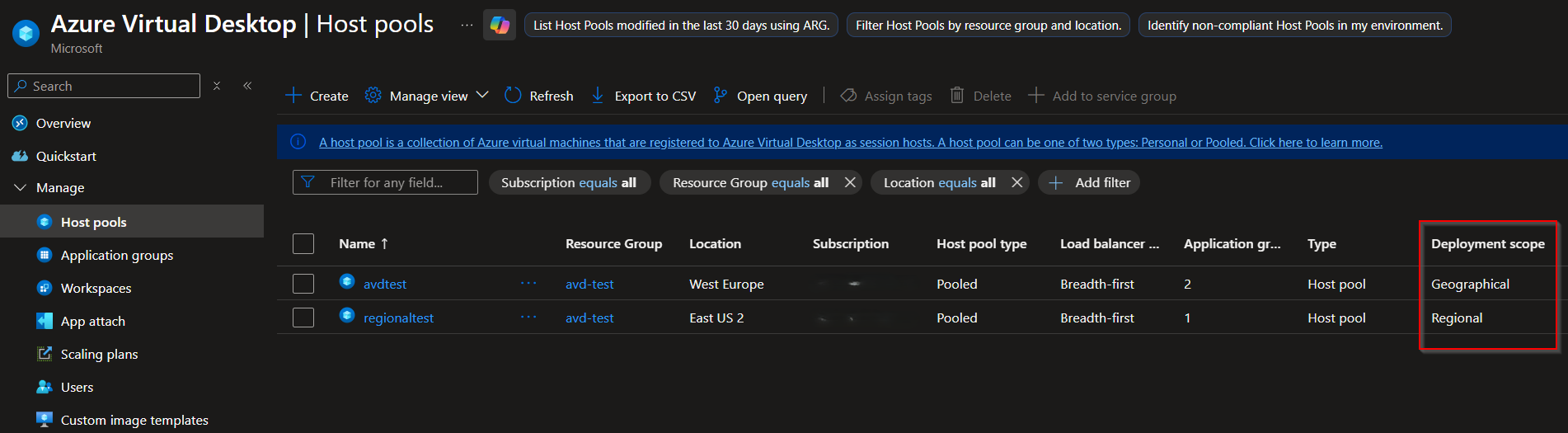
With GA the opt‑in is gone, and the portal now fully supports Regional host pools in regions where the new regional infrastructure is available. When you pick a supported region the portal shows a Deployment scope field during host‑pool creation and a Deployment scope column in the host‑pool list so you can tell at a glance whether an object is Regional or Geographical.
App Attach packages are modelled as regional objects when used with Regional host pools, and application groups inherit the host pool’s Deployment scope automatically. Some features that were phased during preview (Private Link, automated host pools, dynamic autoscale) may still roll out region by region, so always verify availability for your target region. Finally, GA documentation calls out an important monitoring caveat. Errors and checkpoints from regional session hosts aren’t forwarded to Log Analytics. So validate your monitoring and alerting strategy as part of your validation plan.
PowerShell automation still works the same conceptually. Include the DeploymentScope parameter when creating host pools (for example, New‑AzWvdHostPool -ResourceGroupName “testrg” -Name “hostpoolregional” -Location “eastus2” -DeploymentScope “Regional”). If you omit DeploymentScope the host pool defaults to Geographical, and attempts to create Regional host pools in regions that don’t yet have regional infrastructure return “Not Supported”.
Availability of Regional hots pools
GA launched in East US 2 and Central US. Microsoft is enabling additional regions gradually. Because the rollout is phased, two infrastructures (Geographical and Regional) will coexist for a while. Remember that objects with different Deployment scopes are siloed. A Regional host pool can only be part of a Regional workspace and can only contain Regional application groups.
How to create Regional host pools
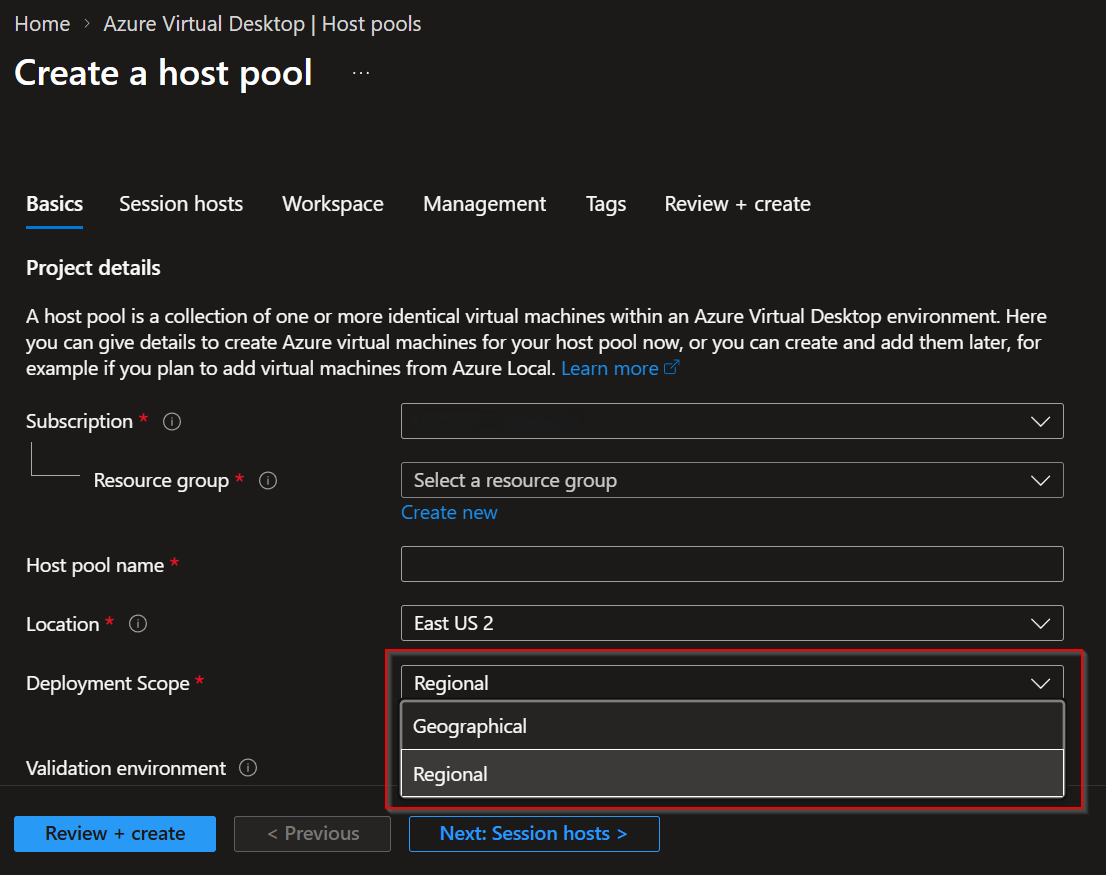
Creating a Regional host pool in the portal is straightforward. Go to Azure Virtual Desktop → Host pools → Create, choose your resource group and name, and select the region. If the selected region supports Regional host pools you’ll see the Deployment scope field. Finish the session host, networking, and workspace settings as usual.
For automation, the PowerShell approach remains the same as in preview. Include the DeploymentScope parameter when creating the host pool.
New-AzWvdHostPool -ResourceGroupName duo-rg-avd-test-switzerlandnorth-001 -Name duo-vdpool-test-eastus2-001 -Location 'eastus2' -DeploymentScope 'Regional' -HostPoolType 'Pooled' -PreferredAppGroupType 'Desktop' -LoadBalancerType 'DepthFirst' -ValidationEnvironment:$false
Validation and testing
If you already tested this feature when it was preview, your work is valuable context, but re‑run validation in a non‑production environment now that GA is available. Preserve these checks from the preview and update them for GA:
- Create a validation host pool in a supported region and place session hosts in the same region.
- Test user logons, reconnects, and session stability under realistic load. Broker behaviour should be unchanged, but validate end‑to‑end.
- Validate FSLogix profile handling.
- Mount/unmount behaviour, profile integrity, and performance
- Test App Attach packages.
- Package creation, assignment, mount/unmount, and app launch.
- Confirm they are created as Regional objects and behave as expected.
- Verify monitoring and diagnostics.
- Given the GA caveat about Log Analytics, make sure the telemetry you rely on is present and create compensating alerts or alternate telemetry if needed.
- Revalidate all automation and IaC. Ensure they are DeploymentScope aware and handle Regional objects correctly.
- If you use Private Link, confirm its support for Regional host pools in your region before rolling to production.
- Test scaling, patching, and management operations to confirm there are no regressions in day‑to‑day operations.
Migration and coexistence
Two infrastructures in the Azure backend will coexist while Microsoft rolls out regional infrastructure and migration tooling. Microsoft is delivering a migration service to move existing geographical host pools to Regional, but the rollout is phased by region. Thus, my advice is a bit conservative: don’t migrate production host pools until the official migration tooling is available for your region.
Operational recommendations
For new deployments in supported regions, create host pools as Regional to benefit from reduced blast radius and clearer metadata residency. For existing geographical host pools, plan the migration, but wait for Microsoft’s migration tool for your region.
If you’re maintaining runbooks and automation, make sure they explicitly check and handle the Deployment scope property.
Conclusion
Regional host pools deliver on the promise from preview: co‑locate metadata with compute to reduce cross‑region control‑plane dependencies and improve resiliency and data residency. With GA you can start using Regional host pools for new deployments in supported regions as of today.