
Microsoft announced regional host pools for Azure Virtual Desktop (short AVD). This feature reduces cross‑region dependencies, limits the blast radius of service or database issues to a single Azure region, and gives you greater control over where host pool metadata lives. Regional host pools are now in public preview.
Below I’ll walk through what’s changing, why it matters, who and what is supported during the preview, and exactly what to do to pilot and test the feature.
IMPORTANT: This feature is in PREVIEW. Read the Supplemental terms for Microsoft Azure Previews before you test the feature in a productive environment.
The Struggle As Of Today
Today AVD stores host‑pool metadata in geography‑level databases that serve multiple Azure regions. Those geography databases already maintain local replicas and a paired‑region replica for failover, but the model still creates a cross‑region control‑plane dependency. An incident affecting the geography database or the region hosting it can impact host pools in unrelated regions.
This creates a real operational risk when control‑plane objects and compute are in different regions. For example, imagine you publish a workspace and host pool whose metadata is stored in West Europe while the session hosts are deployed in Switzerland North. When a user connects the client first talks to the AVD control plane (workspace/host‑pool metadata) to list resources, validate permissions and get broker info, and only then is the client directed to a session host in Switzerland North. If the West Europe metadata database or the West Europe region experiences an outage, the control plane can’t respond normally even though the Switzerland North VMs are healthy. The effects for you and your users are straightforward:
- New connections fail because clients can’t retrieve workspace/host‑pool info or be brokered to a session host.
- Management and provisioning operations that need metadata (assigning users, updating config, scale actions, management blades) fail or time out.
- Existing sessions often continue because the compute plane is up, but reconnects, new logons or operations that require control‑plane validation can be impacted.
- The blast radius can be larger than the affected compute region because the geography database may back multiple regions.
What’s Changing
Regional host pools remove that dependency by placing the AVD metadata and supporting service infrastructure in the specific Azure region you select. If you put the host pool metadata in Switzerland North (the same region as your session hosts), a West Europe incident won’t prevent users from starting new sessions on Switzerland North VMs because the control plane is local to that region. The metadata is stored in a regional database with multiple local replicas across availability zones and paired‑region replication where available. Functionally users won’t notice any change in session behaviour (maybe 0.0001 s of faster connection times to a session host 😉 )
The change is about where the control plane and metadata live, not how sessions and session hosts operate.
Why This Matters
Regional host pools reduce the blast radius of platform outages or database problems so issues are isolated to the affected Azure region rather than affecting many regions. They also give you more precise alignment with data residency requirements because metadata is stored in the exact region you choose.
Imagine a Swiss company that runs session hosts in Switzerland North but today stores its AVD workspace and host pool metadata in the West Europe database. If West Europe suffers a control‑plane incident, users of this company can’t start new sessions even though the Switzerland North VMs are healthy. The control plane that brokers connections is outside the Region. With regional host pools the company instead places the metadata in Switzerland North. In the future, a West Europe outage won’t stop Swiss users from connecting. Furthermore, the company can prove that metadata for its desktops and apps is stored within the Swiss region to meet stricter data‑residency or compliance requirements.
What’s Supported In The Preview
During this public preview the regional infrastructure is being rolled out gradually. Initially, regional host pools are available in East US 2 and Central US (as of updating this blog post on the 3rd of February 2026). Additional regions will be enabled over time as Microsoft completes regional deployments.
For PowerShell only: You need the Az.DesktopVirtualization 5.4.5‑preview module (or newer) module to use the new DeploymentScope parameter when creating host pools and workspaces via the PowerShell. Note that the PowerShell documentation for that module may not be fully updated yet. Application groups inherit the host pool’s DeploymentScope automatically, and because regional metadata lives on different infrastructure you cannot mix Regional and Geographical objects.
What’s Not Supported
Here are the features, which aren’t supported during the preview.
- App attach
- Automated host pools (session host configuration and updates)
- Private Link
- Dynamic autoscaling
- Errors and checkpoints from regional session hosts are not reported into Log Analytics.
- Regional and Geographical objects cannot be associated together.
- Regional app groups can only be linked to regional workspaces and host pools.
Enable The Preview
You must opt in at the subscription level to use regional host pools in the public preview.
Azure portal:
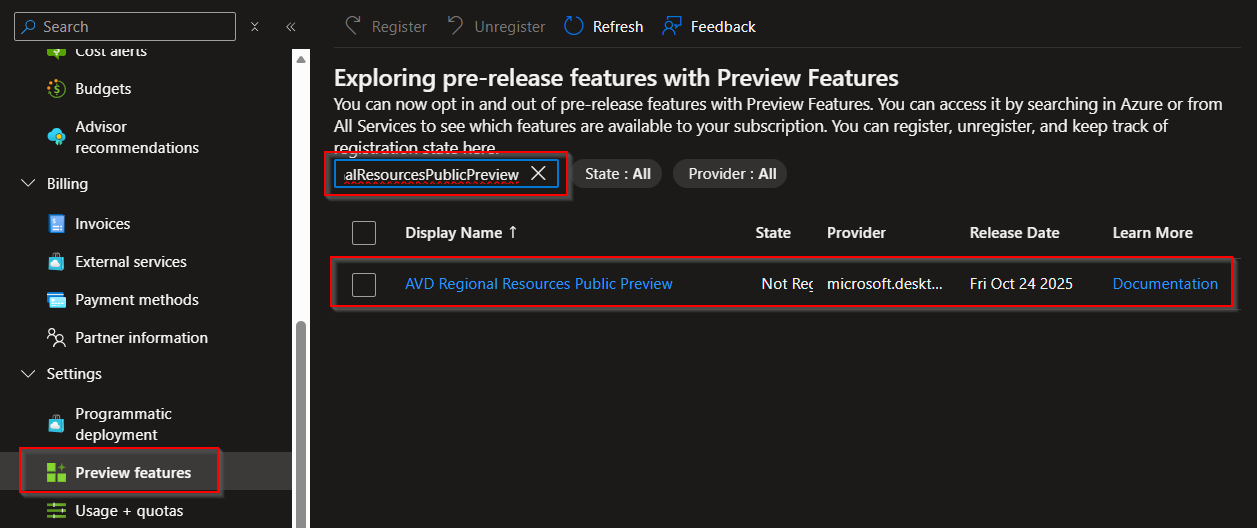
- Sign in to the Azure portal and open Subscriptions.
- Select the subscription, go to Settings → Preview Features.
- Filter for AVDRegionalResourcesPublicPreview, select it and click Register.

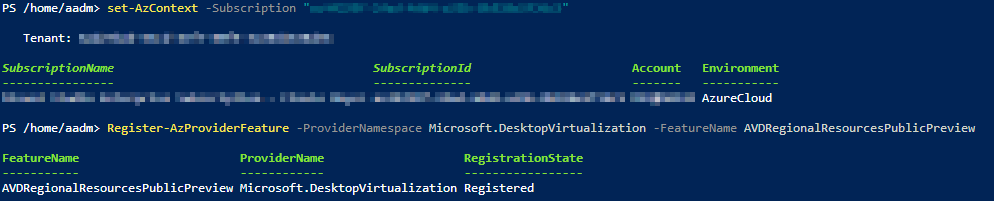
PowerShell (Azure Cloud Shell):
- Make sure you’re connected to the target subscription.
- Connect-AzAccount
- Set-AzContext -Subscription “xxx-xxx-xxx-xxx-xxx”
- Run: Register-AzProviderFeature -ProviderNamespace Microsoft.DesktopVirtualization -FeatureName AVDRegionalResourcesPublicPreview

- After registering the preview feature, install Az.DesktopVirtualization 5.4.5‑preview module (or newer).
- Install-Module -Name Az.DesktopVirtualization -AllowPrerelease -Force
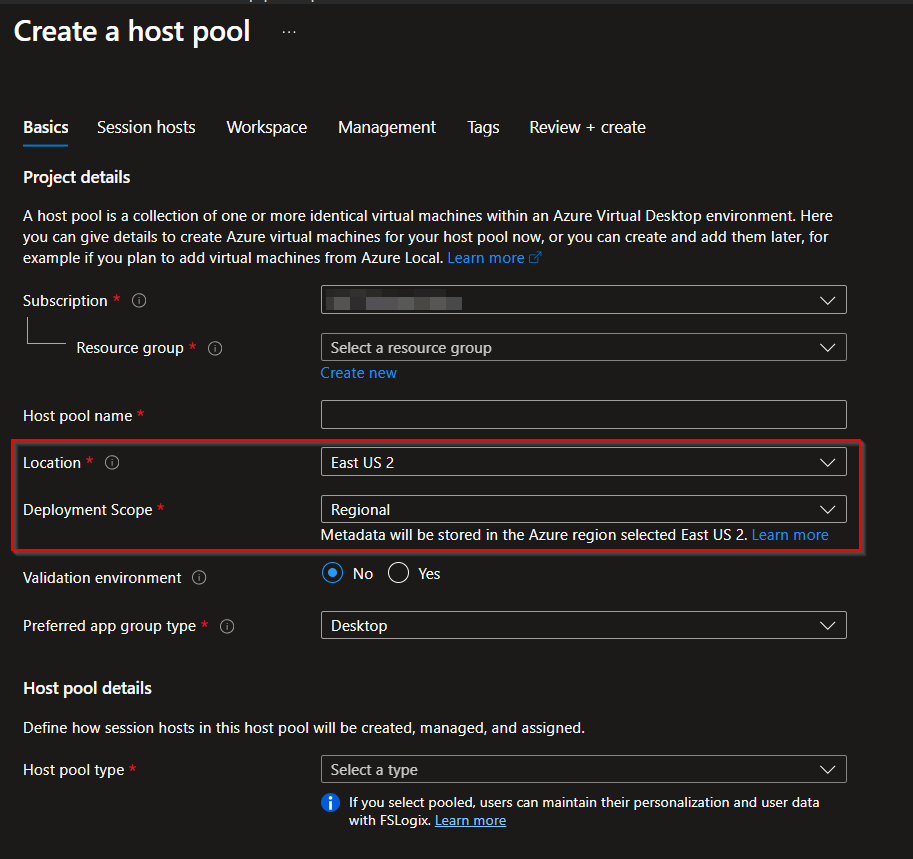
Create A Regional Host Pool
Azure portal:
PowerShell (Azure Cloud Shell):
To create a new regional host pool from PowerShell use the DeploymentScope parameter. Example in-line snippet:
New-AzWvdHostPool -ResourceGroupName duo-rg-avd-test-switzerlandnorth-001 -Name duo-vdpool-test-eastus2-001 -Location 'eastus2' -DeploymentScope 'Regional' -HostPoolType 'Pooled' -PreferredAppGroupType 'Desktop' -LoadBalancerType 'DepthFirst' -ValidationEnvironment:$false
(If you omit -DeploymentScope the default is Geographical.)
Workspaces And Application Groups
When creating workspaces, set the DeploymentScope parameter to Regional for locations that support the regional infrastructure. Application groups inherit the host pool’s DeploymentScope automatically, and because regional metadata lives on separate infrastructure you cannot mix Regional and Geographical objects.
Validation and Testing Guidance
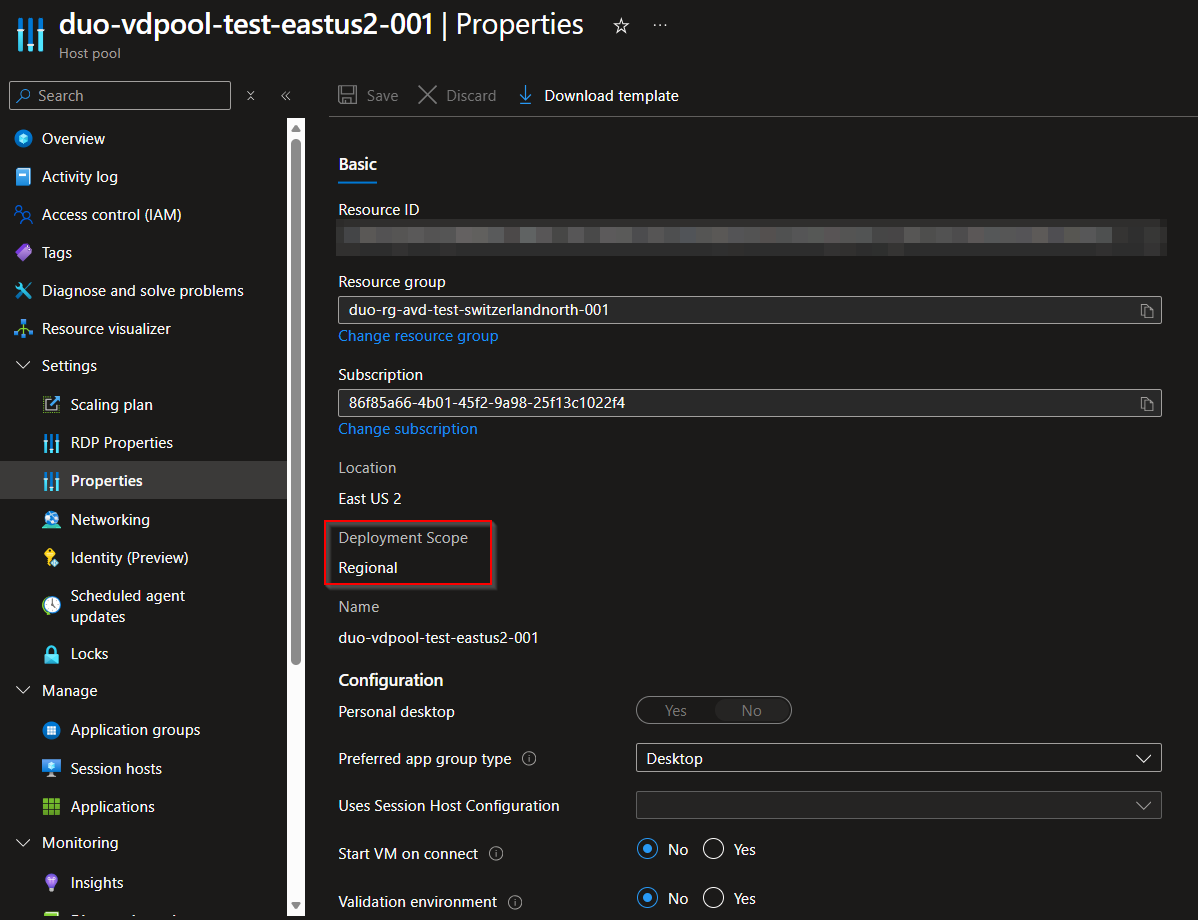
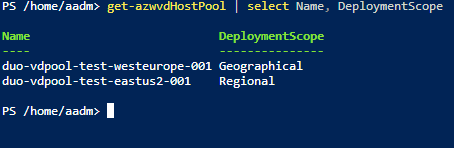
You can also check the deployment scope from PowerShell.
Migration And Coexistence
For a transition period both Geographical and Regional infrastructures will coexist. Microsoft will announce a date when creating new geographical host pools will no longer be allowed and a later date when geographical infrastructure will be retired. Microsoft is building a migration service to move metadata from geographical objects to regional objects. Timing and details will be announced.
Conclusion
Regional host pools are a meaningful resiliency and data‑residency improvement for AVD. During the public preview you must opt in at the subscription level and only some regions are supported to create regional host pools. App Attach and several other features remain geographical‑only during the preview, and Regional and Geographical objects can’t be mixed.
Based on my testing, I don’t recommend enabling this preview in production yet. Wait until the feature is fully integrated into the Azure portal. Also wait until your IaC tooling (Terraform, Bicep) supports it. Finally, ensure your target region is enabled for regional infrastructure before you opt in. That’s when you’ll see the biggest benefit. For many customers (especially those with workloads in Switzerland), co‑locating metadata and compute in a Swiss region will be the real win once regional support lands there. Yayyy!!! 😀