
Microsoft Entra – Soft Delete Devices (Preview)
About six months ago, a good friend called me and asked, “Hey Flavio, I have a question about restoring devices in Entra and Intune.” I had to tell him over the phone that, unfortunately, there was no way to restore them. At that time, the restoration of Entra identities had just been released.
But over the past few days, things have started to look a little different for devices in Entra. Today I stumbled upon a new preview feature in the Entra portal, and this blog post is all about it. Enjoy the read!
Soft Delete – Devices
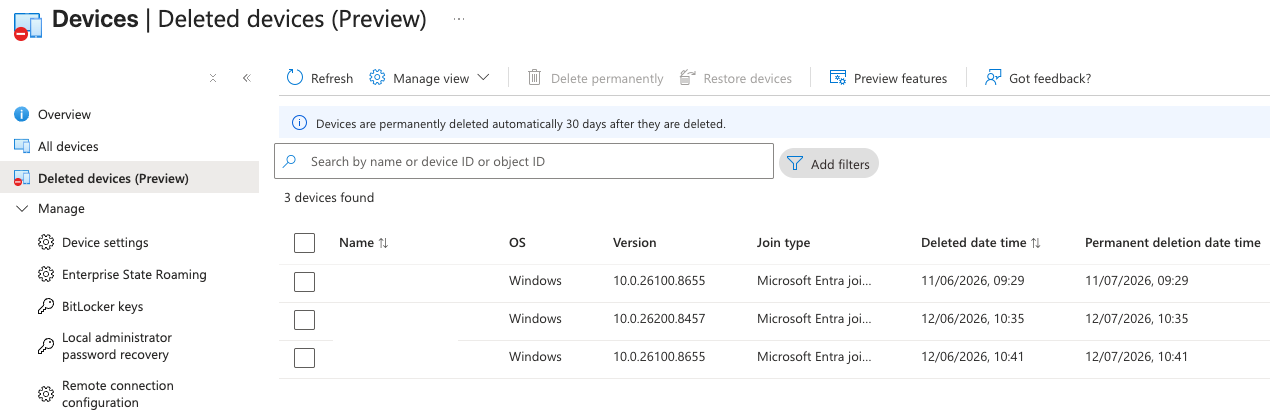
Today, I happened to be in the Device tab of the Entra portal because I needed to delete an AVD object from Entra. While I was there, I noticed something on the left side: Deleted devices (Preview). My first thought was, “Wow, this feature is finally making its way into the Entra world.” When you open the tab, you’re immediately informed that devices are permanently deleted after 30 days.
Pretty cool, right? I’m sure some of you would have been happy in the past to simply click a good old restore button.
It’s important to mention though that if an attacker gains access to the tenant, like in the March 2026 incident at Stryker Corporation where over 200k devices were deleted, there probably still won’t be a real solution. The reason is simple: there is a second button in the view, “Delete permanently.”
My second reaction was just, “Sh…” For an attacker, it is now simply one more button to press and we’re basically back to the same problem. Still, at least we now have the soft delete capability and who knows, maybe Microsoft will eventually remove the “Delete permanently” button in the future.
What Happens During a Device Soft Delete
When a device is deleted in Microsoft Entra ID, it isn’t removed right away. Instead, it enters a soft-deleted state where its authentication is disabled and the device is hidden from management tools like the Azure portal, Intune, and Microsoft Graph. The device keeps its unique ID, which means no other device can register with the same ID during this time. Soft-deleted devices still count toward the directory quota, but only as a smaller tombstone object. After 30 days, the device is automatically and permanently deleted.
Device types eligible for soft delete
During the preview, device soft delete works for Microsoft Entra joined, hybrid joined, and registered devices. These devices can be recovered within the soft-delete period instead of being removed immediately. Devices that don’t have a recognized trust type or belong to special categories like secure VMs, non-persistent VDI instances, or printers are not supported. These are still hard deleted right away when removed.
Preserved device data during soft delete
When a device is soft deleted, important information linked to the device is kept in the soft-deleted container. This includes BitLocker recovery keys, which remain available to administrators and the device owner after restoration, LAPS-managed local administrator passwords, and the device’s unique identity and key material. These preserved details allow the device to be fully restored. Once the device is recovered, it returns to the active container with all these properties intact.