
Redundant TCP transport paths for AVD & Windows 365
In November 2025 I covered the general availability rollout of RDP Multipath for Azure Virtual Desktop (short AVD) and Windows 365 (short W365). That feature brought multiple redundant UDP paths with near‑instant failover using ICE, STUN and TURN. You can read the original blog post here if you need a refresher.
As of April 2026 Microsoft expanded the technology in public preview, adding redundant TCP transport paths. In July 2026 redundant TCP transport paths became generally available for AVD and W365. This evolution brings resiliency benefits even to users who cannot consistently establish UDP Shortpath connectivity. Below I’ll walk through what changed, why it matters, what you need to check, and how to get ready.
What changed
RDP Multipath can now maintain additional standby TCP-based reverse connect transports, alongside the existing UDP Shortpath candidates. The system continuously evaluates all available UDP and TCP paths. If the active path becomes unstable, Multipath can switch to the next best candidate immediately and transparently.
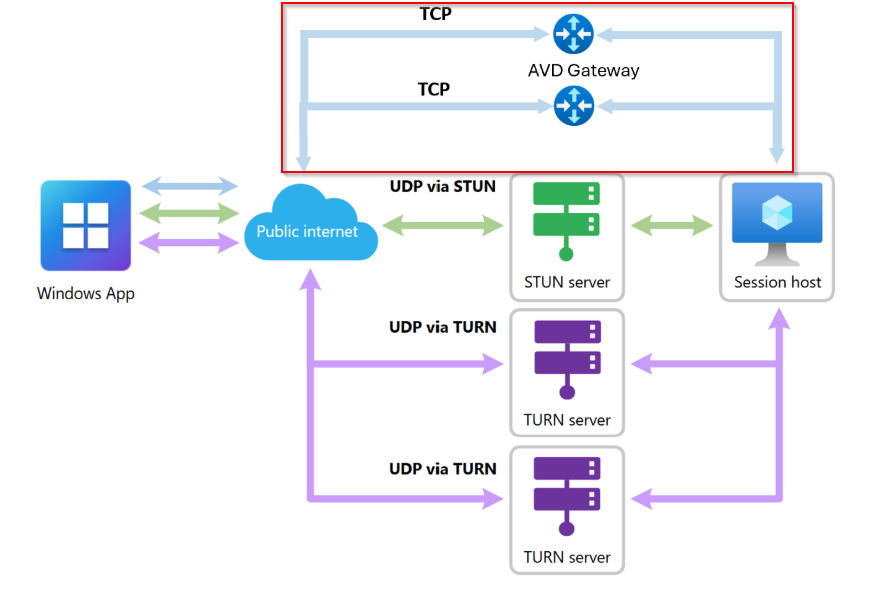
The core Interactive Connectivity Establishment (short ICE) logic does not change. ICE still gathers, exchanges, ranks, and monitors candidates. The difference now is that TCP reverse connect paths join the candidate list as additional fallbacks.
Think of it like this:
- UDP remains preferred.
- Backup TURN candidates stay warm.
- Now extra TCP Reverse Connect paths also stay warm.
This expanded menu of active and standby transports is what increases reliability, especially in network conditions that are far from perfect.
Why this matters
UDP Shortpath is still king when it comes to performance and low latency, but not all users or networks allow UDP to flow cleanly. Branch networks, hotels, guest Wi‑Fi, strict corporate firewalls, or mobile hotspots can all force sessions back to TCP.
Before this update, those TCP-only scenarios had no Multipath resiliency. Now they do.
RDP Multipath can now manage a mix of:
- UDP via STUN (fastest path, lowest latency)
- UDP via TURN (fallback through relays)
- TCP via Reverse Connect over the AVD gateways (newly redundant in preview)
If the current transport degrades, Multipath instantly moves to a better one. If all paths fail during an outage, the system automatically reconnects once connectivity is restored.
Platform and prerequisites
To take advantage of redundant TCP Multipath for Windows (GA) and the new macOS UDP Multipath beta, make sure the following prerequisites are met and the environment is prepared accordingly:
- Connections must be from a local Windows device using the Windows App or from macOS using the Windows App on macOS Beta:
- Windows App on Windows 2.0.559.0 or later enables RDP Multipath with multiple UDP transport paths (UDP‑only Multipath).
- Windows App on Windows 2.0.1069.0 or later is required to gain the additional resiliency benefits of redundant TCP transport paths.
- Windows App on macOS Beta 11.3.8 (3048) or later enables UDP Multipath for macOS clients (beta channel).
- RDP Shortpath should still be configured as the primary transport; Multipath depends on it even for TCP fallback.
- If UDP is available, it will always be the preferred and highest‑performing transport.
- Test connectivity from real endpoints and validate Multipath is active in the client connection bar. Use AVD Insights to monitor connection reliability and spot NAT/port issues at scale.
Required network endpoints
- Required outbound endpoints and ports
- UDP 3478 to TURN servers (relayed UDP).
- Ephemeral UDP ports for STUN/direct UDP (default ephemeral range 49152–65535; some environments use 1024–65535).
- TCP 443 to *.wvd.microsoft.com for Reverse Connect/management traffic.
- Plan for per‑user port scaling
- Each active session can use up to three UDP transport paths and up to two TCP transport paths simultaneously. Ensure your NAT/firewall has enough ephemeral ports and concurrent session capacity to avoid port exhaustion.
- NAT and firewall configuration
- Preserve NAT port mappings and connection state for the lifetime of the RDP session. Short NAT timeouts, port remapping, or aggressive connection tearing can cause failovers or disconnects.
- Where possible, provide direct internet egress for AVD traffic (or use split tunneling) to avoid hair‑pinning through centralized appliances that create extra latency or state churn.
- Avoid in‑path TCP/UDP manipulation
- Do not apply deep packet inspection, TLS re‑encryption, TCP reassembly, or other intrusive middlebox processing to RDP traffic. These can add latency, disturb TCP streams, and trigger unnecessary failovers.
- If inspection is required for policy reasons, ensure it is applied in a way that preserves low latency and connection stability (for example, offload inspection or allow exceptions for AVD traffic).
Azure Goverment
Conclusion
This release marks an important step forward. RDP Multipath started with redundant UDP paths in 2025, and now (July 2026) it adds redundant TCP transports that are generally available for AVD and W365. For environments where UDP isn’t always available, this is a meaningful improvement in session resiliency and user experience.
The administrative steps remain largely the same: keep clients updated, enable Shortpath, allow UDP, and configure correct egress. No validation‑ring opt‑in is required for AVD or W365 now. When you do, your users, especially those behind restrictive networks, will notice the difference.
Sources
- Microsoft Learn: What’s New in Azure Virtual Desktop — Enhanced session resilience with RDP Multipath
- Microsoft Learn: What’s New in Azure Virtual Desktop — RDP Multipath in Azure Government
- Microsoft Learn: What’s New in Azure Virtual Desktop — RDP Multipath with UDP support for Windows App on macOS Beta
- Microsoft Learn: What’s new in Windows 365 Enterprise and Windows 365 Flex — RDP Multipath with redundant TCP transport paths is now generally available
- Microsoft Learn: RDP Multipath documentation