
Keep desktops local, manage from Azure: Azure Virtual Desktop Hybrid reaches GA
Azure Virtual Desktop Hybrid is now generally available. The feature brings the Azure Virtual Desktop (short AVD) control plane into environments that continue to run session hosts on customers’ own infrastructure. This means, that the virtual machines continue to run on VMware vSphere, Nutanix AHV, Hyper‑V, or dedicated physical Windows Server devices. Azure Arc connects those on‑premises machines to Azure, and an AVD Arc extension installs the AVD runtime and registers the machine with a host pool. The result is a single, cloud‑managed brokering plane in Azure with session hosts that can stay where your data and compute already live.
Below I’ll walk through what Azure Virtual Desktop Hybrid is, how it changes the AVD model conceptually, what it enables (and doesn’t), licensing considerations, and where it fits in real‑world architectures.
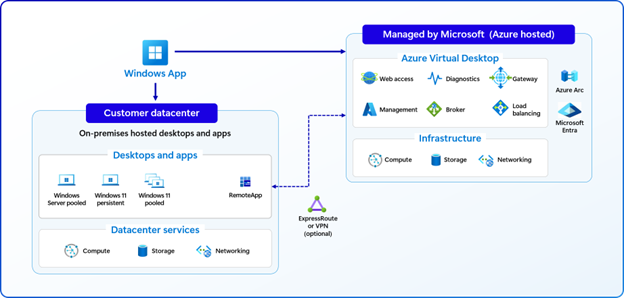
What Azure Virtual Desktop Hybrid is
At a conceptual level Hybrid separates two responsibilities cleanly. Microsoft continues to operate and manage the Azure Virtual Desktop control plane: brokering connections, maintaining workspaces and services in Azure. While customers retain ownership and operational control of the session host infrastructure on their premises or edge locations. Azure Arc provides the connectivity and management surface that lets those on‑premises machines appear as manageable resources in Azure. The AVD Arc extension then deploys the session‑host components and registers each Arc‑enabled machine with the chosen host pool.
Why this matters
Hybrid addresses a common enterprise reality. Not all workloads or data can move to Azure immediately. Organizations often need to keep compute local for latency, compliance, regulatory, or cost reasons. Hybrid gives those organizations the benefits of the Azure Virtual Desktop control plane, without forcing migration of session hosts to Azure. It enables phased modernization. You can keep sensitive workloads on‑premises, maintain existing tooling and processes, and still adopt cloud‑based management and features where they make sense.
Architecture differences from cloud‑native AVD
The core difference is where compute runs versus where the control plane lives. In cloud AVD both control plane and session hosts are deeply integrated with Azure platform services and VMs run in Azure. In Hybrid the control plane remains fully cloud‑native in Azure, but session hosts are ordinary on‑premises VMs or dedicated physical servers that you operate. Practically this means:
- Outbound‑only connections: session hosts communicate with Azure over outbound HTTPS calls. That reduces network complexity because you don’t need inbound ports on your session hosts for brokering.
- Clear operational split: Microsoft manages the service in Azure. You continue to manage OS patching, VM lifecycle, power state, hypervisor operations and local storage/networking.
- Integration via Arc: Azure Arc acts as the bridge. It brings inventory, configuration, and extension‑based deployment to your on‑premises servers so they can participate in Azure Virtual Desktop host pools.
Conceptual trade‑offs
Adopting Hybrid is an architectural choice. You get control, compliance, and locality by keeping compute on‑premises, but you also accept the operational responsibilities that come with it. If your priority is a fully managed, elastic, cloud‑native desktop service with VM lifecycle automation and multi‑session density, cloud AVD remains the simplest path. If you need to maintain on‑premises compute while centralizing brokering and policy, Hybrid is a compelling middle ground.
Supported operating systems and licensing
Hybrid supports a mix of Windows Server and Windows client operating systems:
- Windows Server (supported): Windows Server 2016, 2019, 2022 and Windows Server 2025. Typically licensed via RDS CALs with Software Assurance or RDS User Subscription Licences for user access.
- Windows client (supported as VMs): Windows 10/11 Enterprise (single‑session). Licensing is governed by Microsoft 365/Windows Enterprise licensing, VDA per user, or per‑user pricing models where applicable.
- Not supported: Windows 10/11 Enterprise multi‑session on Hybrid.
The licensing model for the Hybrid service itself uses a per‑user service pricing layer in addition to the OS access entitlements. Infrastructure costs (compute, storage, network) remain with the customer.
Key capabilities and constraints
Capabilities you gain
- Windows App behaves the same whether the session host is in Azure or on‑premises.
- Session brokering, workspace management and identity integration remain consolidated in Azure.
- Run session hosts on your preferred hypervisor or on dedicated physical servers when needed for performance or compliance.
- Outbound HTTPS connections from session hosts reduce firewall complexity compared with some legacy RDS designs.
Operational and feature constraints
- Hybrid does not provide built‑in autoscale, Start VM on Connect, or power management for on‑premises hosts. You remain responsible for VM/host provisioning, power state and image management.
- Windows 10/11 Enterprise multi‑session is not supported on Hybrid. Multi‑session use cases remain a cloud AVD scenario.
- Physical devices are supported only as dedicated, session hosts (rack‑mounted or similar).
- Features that rely on Azure VM lifecycle or platform services may behave differently and will often need alternative approaches or partner tooling on‑premises.
Conclusion
Azure Virtual Desktop Hybrid brings an option to organizations balancing modernization with existing infrastructure realities. It decouples the cloud‑native AVD control plane from the physical or virtual location of session hosts, letting you keep compute where it needs to be while adopting centralized brokering, identity and management from Azure. The feature is especially useful for compliance‑sensitive, latency‑bound, or investment‑preserving scenarios, and it creates a clear pathway for phased modernization toward cloud‑native desktops in the future.