
Teams On VDI Levels Up: Updates In March 2026
Microsoft has delivered one of the most meaningful updates to Teams in virtual desktop environments in quite some time. As of March 2026, the new SlimCore-based media optimization architecture is now in public preview for macOS in Azure Virtual Desktop (short AVD), and the WebRTC-based Teams optimization stack has officially reached general availability for AVD. Together, these updates move Teams toward a unified, modern, and platform‑consistent VDI experience across Windows, macOS, Citrix, Amazon WorkSpaces, and (in preview) Omnissa Horizon.
Below I’ll walk through what changed, why it matters, what you need to run the new optimization stack, and exactly what to test before adopting SlimCore in your environment.
IMPORTANT: macOS SlimCore optimization is in PREVIEW. Read the Supplemental terms for Microsoft Azure Previews before you test the feature in a productive environment.
What’s SlimCore
The biggest change is the expansion of the SlimCore media engine to additional platforms (macOS). SlimCore is the same engine used in the full desktop Teams client and replaces the long‑standing WebRTC optimization path used in VDI. Instead of relying on a separate media stack, Teams now uses a lightweight MSIX‑based framework that runs locally on the endpoint and processes audio and video directly on the device.
Why This Feature Matters
This architectural change improves the experience for users running Teams on VDI. Until now, macOS users were stuck with fallback rendering or the limited WebRTC engine. With SlimCore, macOS endpoints finally gain a near‑native Teams media stack, offering better performance, feature parity, and far more capabilities. In short: Teams on VDI starts feeling like Teams, regardless of endpoint OS.
How The New Architecture Works
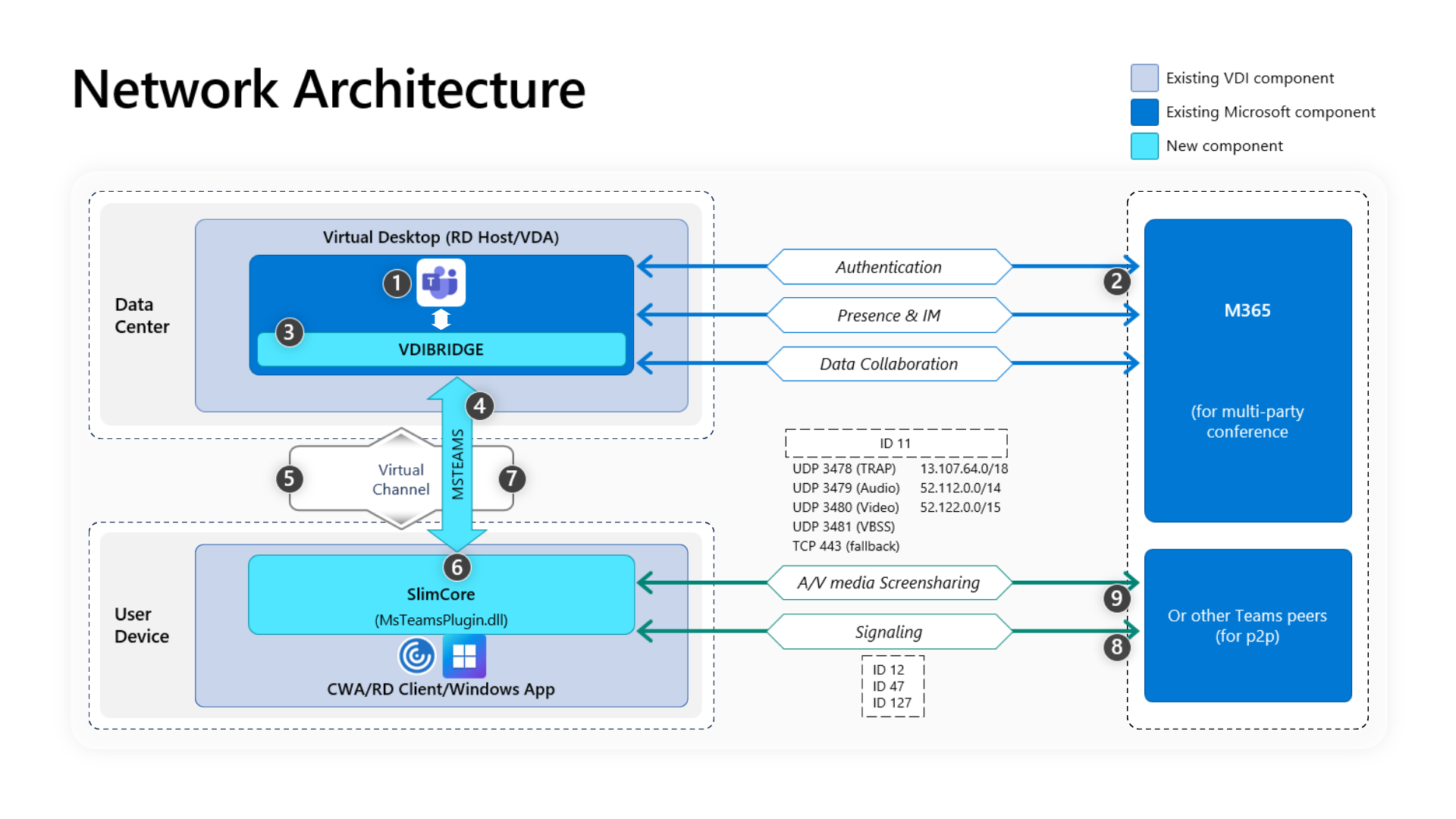
Under the hood, the new VDI solution consists of several components working together. Teams running inside the session host detects it is in a virtual desktop scenario and activates an internal service called vdiBridge. This service communicates over a custom Teams-owned virtual channel. On the endpoint, a small plugin loads SlimCore, an approximately 50 MB MSIX package downloaded from Microsoft’s CDN, and handles real-time media processing locally.
The session host is responsible for signalling and session coordination, but all heavy lifting (audio, video, codec negotiation, rendering) takes place on the endpoint. That reduces CPU load on the session host, increases scalability, and delivers noticeably better call quality.
macOS Teams VDI Optimization: What Works Today
The macOS preview delivers a far more complete experience than many expected. Once the correct client versions are in place, SlimCore installs and updates silently on the Mac, moving all audio, video, and real-time media processing to the endpoint. Teams running on the session host simply coordinates signalling. In practice this makes Teams on macOS feel much closer to the native desktop client than anything possible with the legacy WebRTC engine.
Minimum Requirements
Because SlimCore is integrated with the Teams client, version alignment across all components is essential. A mismatch almost always results in fallback behaviour, so verify the versions before you begin testing.
For Azure Virtual Desktop with macOS, you’ll need:
- Teams version 24193.1805.3040.8975 or higher
- Windows App for macOS version 11.3.2 (non‑store MAU client — required)
- macOS 14, 15, or 26
If you have Citrix environments, the requirements are:
- Citrix Workspace app for macOS 2508.10 or newer
- A corresponding MsTeamsPluginCitrix package
- Teams version 24295.605.3225.8804 or higher
For Amazon WorkSpaces and Horizon, SlimCore is currently supported only on Windows endpoints. macOS support for those platforms is not yet available.
A critical note: The Mac App Store version of the Windows App does not include the Teams VDI plugin. If users launch Teams via the App Store client, SlimCore optimization cannot activate and Teams will fall back to WebRTC or even full server-side rendering.
Feature Improvements With SlimCore
SlimCore gives macOS endpoints access to the modern Teams media pipeline and a feature set that previously only existed on Windows. Once optimized, users benefit from capabilities such as:
- 1080p video and higher-quality codecs
- AI-based noise suppression
- Hardware acceleration
- Larger and more modern gallery views
- Custom backgrounds and background effects
- Presenter mode
- QoS tagging and prioritization
For organizations with collaboration-heavy workloads or users who depend on high-quality video meetings, this upgrade represents a major leap forward.
Current Limitations
Because macOS SlimCore support is still in preview, a few platform-specific gaps remain. Today, the following capabilities are not yet supported:
- HID headset controls
- System audio sharing
- Outgoing screen sharing in end-to-end encrypted meetings
- Multi‑monitor scenarios without occasional layout inconsistencies
- Authenticated proxies in macOS network settings
There are also several platform-wide limitations that apply to SlimCore across all endpoints, not just macOS. Teams cannot be optimized when running as a RemoteApp or published application, so a full desktop session is still required. Townhall and Live Event attendees fall back to server-side rendering, which increases CPU usage on the session host. And if your environment uses WDAC, AppLocker, or Unified Write Filters, SlimCore’s MSIX packages may require explicit allow-listing or exclusions to stage and register correctly.
Known Issues
As with any preview, there are some rough edges. On macOS, users may notice slow cursor movement when sharing applications or find that video appears on the wrong display after rearranging monitors during a call. In Citrix environments, certain combinations of VDA/CWA client versions and older Teams builds can cause app-sharing sessions to freeze. Background effects may also fail to apply for users upgrading from older Teams versions, and locking the virtual machine during an active call may disconnect the session unless all components are fully updated.
If you’re operating in a network-restricted environment, keep in mind that SlimCore depends on several Microsoft endpoints, especially for UDP-based media transport. If these endpoints are blocked, optimization will fail and Teams will silently fall back to rendering on the session hosts.
How To Verify That Teams Is Optimized
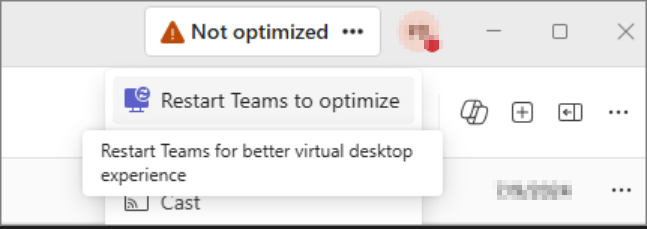
Once Teams is launched, the client will automatically attempt to engage SlimCore if all requirements are met. Teams includes a built‑in indicator that shows which optimization path is active. You’ll find it in the top-left corner of the window.
The indicator will show one of the following states:
- SlimCore Media Optimized — the new architecture is active
- Media Optimized — legacy WebRTC optimization is in use
- Warning icon and “Not optimized” — unoptimized, falling back to server‑side rendering
On Windows endpoints you can also verify optimization by checking for the MsTeamsVdi.exe process running under the Remote Desktop client or the Citrix Workspace app. On macOS, Activity Monitor will show the corresponding SlimCore processes once optimization is active. These checks are extremely useful when troubleshooting version alignment issues.
Should You Deploy This Today
If you run AVD on Windows endpoints, start planning your transition to SlimCore now. SlimCore is the clear successor to WebRTC and brings significant performance gains. If you’re heavily invested in macOS, this preview is worth testing immediately. Just don’t roll it into production until the macOS implementation is fully supported and your VDI client versions include complete plugin auto‑installation.
If you operate in highly locked‑down environments (AppLocker, WDAC, thin clients, UWF), test early and thoroughly. The most common failure point is SlimCore’s MSIX packages being blocked from staging and registering.
Conclusion
March 2026 marks a major step forward for Teams in VDI. With SlimCore expanding to macOS and additional platforms, Microsoft is steadily moving toward a unified media optimization architecture. Users benefit from modern capabilities, better reliability, and significantly improved performance.
For now, begin testing, especially if you support mixed endpoint environments. SlimCore is the future of Teams optimization, and the improvements in call quality alone will make your users (and your session host CPU usage) very, very happy.