
RDP Shortpath Over Private Link Goes Generally Available
Microsoft has announced that RDP Shortpath (UDP) over Azure Private Link is now generally available (short GA) as of February 2026. With this release, Azure Virtual Desktop (short AVD) can now establish high‑performance, UDP‑based Shortpath connections between clients and session hosts using private IP addresses routed entirely through a Private Link.
This capability complements the existing TCP‑based RDP connectivity over Private Link. Together, admins can now run AVD fully over Private Link using both TCP and UDP, which is critical for organizations with strict network isolation or regulated environments that require full private access to AVD.
Below I’ll break down what changed, why it matters, what you need to prepare, and exactly how to enable UDP‑based Shortpath through Private Link.
UDP‑Based Shortpath Through Private Link
RDP Shortpath for managed networks provides a direct UDP path for improved performance, lower latency, and higher reliability. Until now, UDP Shortpath was not compatible with Private Link. Connections using Private Link would always fall back to WebSocket-based TCP transport, regardless of Shortpath configuration on the host pool or session host.
With this GA release, you can now explicitly enable UDP over Private Link at the host pool or workspace level.
This is especially important for highly constrained or regulated environments where:
- Public connectivity is not allowed.
- All user and session‑host traffic must remain on private networks.
- Network teams require predictable IP assignment.
- Security policies must enforce explicit Private Link paths.
Summary Of The Change And Why It Matters
The key change is that RDP Shortpath UDP transport is now fully supported over Private Link, but only when explicitly opted-in. This matters because it finally enables RDP connections over Private Link while using private IP addresses for both TCP and UDP transports. Administrators gain tighter control of where session traffic flows, which is especially valuable for organizations with strict compliance requirements or internal network governance. With this update, AVD sessions can maintain predictable behaviour, ensuring that all traffic stays on private routes and avoids any public exposure. It also means that Shortpath can now deliver its full performance benefits even in highly isolated, locked‑down environments.
At the same time, it’s important to say, that standard AVD RDP connectivity continues to provide strong performance, reliability, and simplified operations for most deployments. UDP over Private Link is not intended for every scenario. It is specifically designed for customers, who already rely heavily on Private Link and require precise control over their private network boundaries.
Platform & Prerequisites
Before enabling UDP Shortpath over Private Link ensure those prerequisites are met:
- Private Link must also be enabled on each Azure subscription before AVD resources can use it.
- Your AVD session hosts are running supported Windows OS builds.
- Your environment already uses Private Link for host pools or workspaces.
- Your DNS configuration (privatelink.wvd.* and privatelink‑global.wvd.* zones) is correct.
- You understand the Private Link endpoints required per host pool and workspace.
- You plan for the dynamic TCP port range (1–65535) needed for AVD’s reverse connect.
- You can restart session hosts after enabling UDP or modifying Private Link endpoints.
How To Enable UDP Over Private Link (Azure Portal)
To enable RDP Shortpath (UDP) over Private Link:
- Open the Azure Virtual Desktop Host pool in the Azure portal.
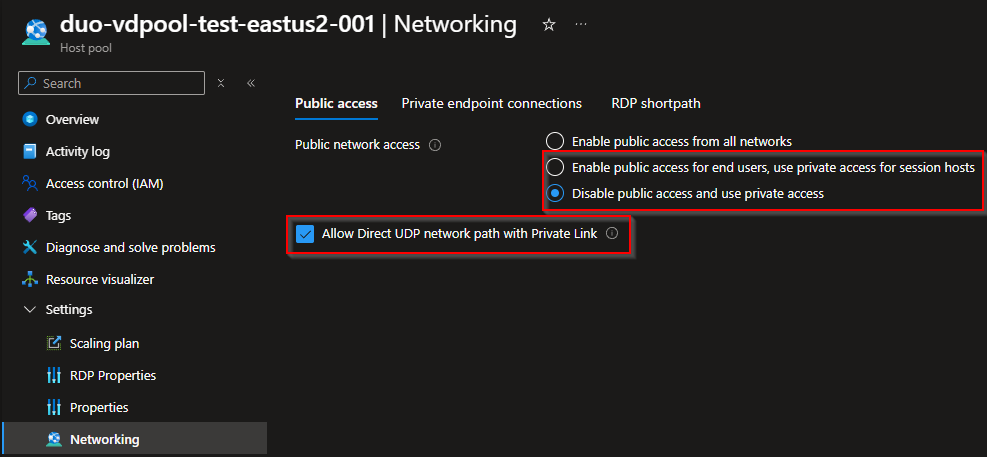
- Go to Networking → Public access.
- Choose one of the following options:
- Enable public access for end users, use private access for session hosts
- Disable public access and use private access
Selecting either reveals the UDP opt‑in checkbox.

- Check the box Allow Direct UDP network path over Private Link.
- Select Save.
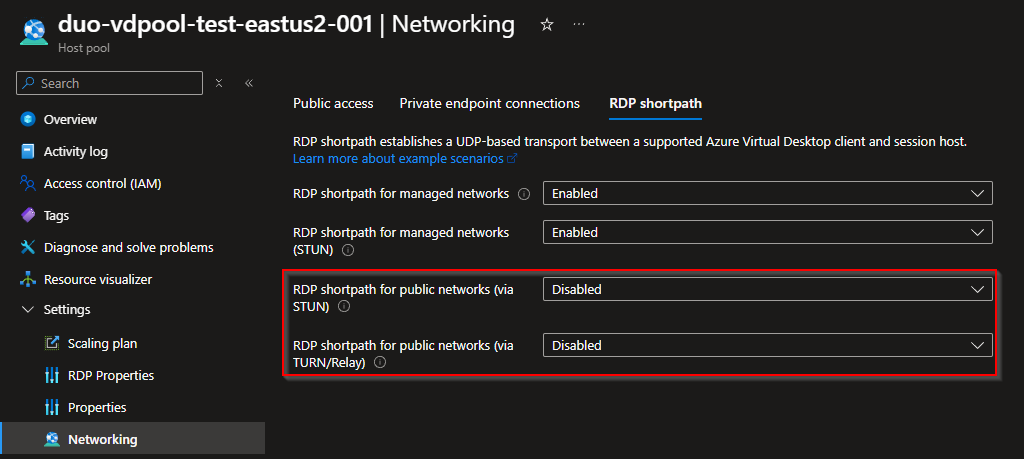
- Go to the RDP Shortpath tab and disable:
- RDP Shortpath for public networks (via STUN)
- RDP Shortpath for public networks (via TURN)
The portal will block Save if these are still enabled.

- Select Save.
Important
- The UDP opt‑in checkbox is mandatory. Without it, RDP Shortpath is blocked for all Private Link connections and AVD falls back to WebSocket (TCP).
- Opting in only enables UDP as a transport “mode”. You still need proper Shortpath configuration on each session host and networks.
Verify And Validate
To confirm UDP over Private Link is working:
- Check effective RDP Shortpath policies on the session host.
- Validate that STUN/TURN Shortpath modes are disabled.
- Confirm DNS queries resolve Private Link IPs (privatelink.wvd.*).
- Use “Connection Diagnostics” in AVD Insights to view transport mode (UDP/Shortpath).
- Test a session and confirm UDP‑based Shortpath appears in the AVD diagnostic logs.
- Validate that no public IPs are used during session establishment.
If connections still use WebSocket (TCP), verify the UDP opt‑in checkbox, DNS mapping, and network firewall rules.