GSA And New Azure Bastion Feature At #mscloud4itpro

Die 13. Ausgabe (die erste in diesem Jahr) des MS Cloud for IT Pro Zentralschweiz Community Events fand am 21. Januar 2026 im AI‑Hub Luzern (LAC2) statt. Gehostet wurde das Event wieder von Ivo Bättig und Yannic Graber. Zwei starke Fachvorträge, praxisnahe Demos und viele Fragen aus dem Publikum machten den Abend besonders wertvoll und standen ganz im Mittelpunkt dieser Ausgabe des Community-Events von letztem Mittwoch.

Ein besonderer Dank gilt den Sponsoren, TD SYNNEX und Joker IT, die durch ihre Unterstützung massgeblich dazu beitragen, dass die Meetups stets hervorragend organisiert sind. Weitere Informationen zu anstehenden Events findet ihr hier: MS Cloud for IT Pro Zentralschweiz | Meetup oder auf der LinkedIn-Seite von der Joker IT.

Einleitung

Yannic eröffnete das erste MS Cloud for IT Pro Zentralschweiz Community Event dieses Jahres und hiess das Publikum herzlich willkommen. Er betonte, dass es diesmal wieder ausschliesslich Gastreferate gab. Dies sei ein deutliches Zeichen für das Wachstum der Community in der Zentralschweiz. Besonders freute er sich über einige neue Gesichter und darüber, dass bereits die 13. Ausgabe des Events stattfand. Anschliessend stellte er kurz die Agenda des vergangenen Mittwochs vor und wies darauf hin, dass die Teilnahme weiterhin kostenlos sei, die Anmeldung jedoch verbindlich erfolgen solle (für die Planung des Apéros). Zudem rief er das Publikum dazu auf, die Meetups interaktiv zu gestalten. Das heisst: Mitdiskutieren wird ausdrücklich erwünscht.

Agenda

🕧 18:20 – Eintreten, Begrüssung & Empfangsgetränk
🎙  18:30 –  Eröffnung durch die Moderatoren
📌 18:35 – Goodbye VPN: Microsoft Entra Global Secure Access
📌 19:20 – Finally No Local Admins: Azure Portal Sign‑In to VMs with Entra ID & Bastion
🍽️ 20:15 – Diskussion & Networking

Goodbye VPN: Microsoft Entra Global Secure Access

Der erste Fachvortrag wurde von Oliver Müller gehalten. Er machte deutlich, warum klassische VPNs, speziell Point‑to‑Site‑VPNs, heute oft nicht mehr ausreichen. Remote Work, Cloud‑Workloads und gezielte Angriffe auf SSL‑VPNs haben das Bedrohungsbild des traditionellen Unternehmensnetzwerks verändert. Deshalb sieht er Global Secure Access (kurz GSA) als sinnvolle Alternative für Point‑to‑Site‑VPNs. GSA ist tief in Microsoft Entra integriert und basiert auf Zero‑Trust‑Prinzipien.
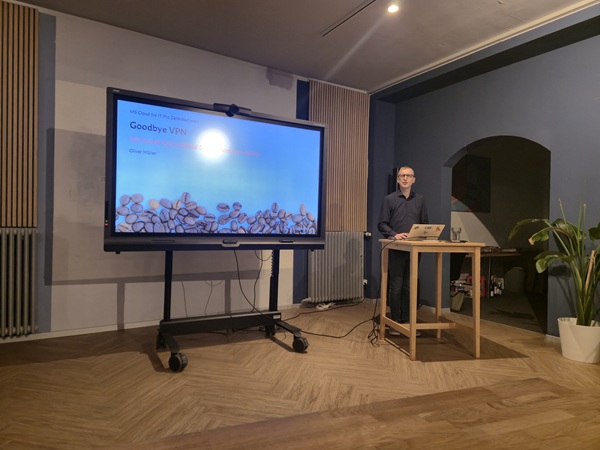
Kernpunkte des theoretischen Teils der Präsentation

  • Entra‑native Lösung, kompatibel mit Conditional Access (kurz CAP).
  • Zero‑Trust als zentrales Designprinzip von GSA.
  • Drei Traffic‑Profiles: Microsoft (z. B. Exchange, SharePoint, Teams), Private (Fileshares, Applikationen, DB) und Internet (Webzugriffe mit Filterung).
  • Verringerte Exposition gegenüber Token‑Diebstahl durch enge Entra‑Integration.

Lizenzhinweis

  • Entra ID P1 bildet die Basis für GSA (Microsoft Traffic-Profile)
  • Zusätzliche Profile sind als Add‑ons verfügbar (rund 5 CHF/Benutzer/Monat) oder oft kostengünstiger über die Entra Suite zu lizenzieren.

Live‑Demo

Oliver demonstrierte praxisnah das Setup von GSA. Er legte ein GSA‑Profil an, integrierte M365‑Profile und zeigte Private‑Access‑ sowie Internet‑Access‑Szenarien inklusive Webfiltering. Zusätzlich stellte er den GSA‑Client und dessen Logging‑Funktionalitäten vor. Die gezeigten Schritte waren sehr konkret und unmittelbar umsetzbar bei vielen SMB Kunden, da er bereits einige Erfahrungen mit den gezeigten Einstellungen sammeln konnte.

Finally No Local Admins: Azure Portal Sign‑In To VMs With Entra ID & Bastion
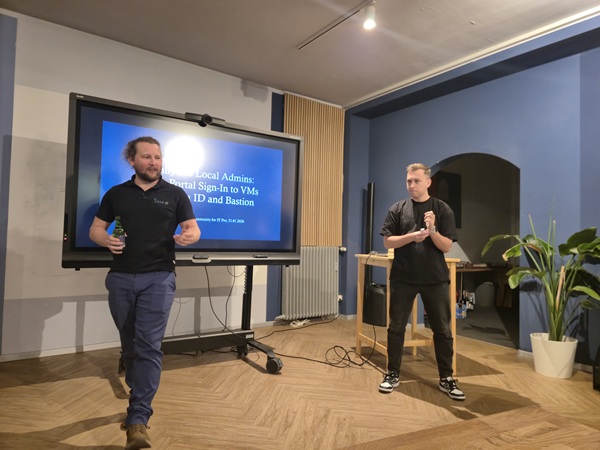
Nico Wyss, der zweite und abschliessende Referent des Abends, zeigte die bisher üblichen Zugriffswege auf Azure‑VMs (RDP, Just‑In‑Time u.ä.) und die damit verbundenen Sicherheitslücken. Er wies darauf hin, dass der Umgang mit lokalen Administrator‑Konten auf Azure-VMs nicht immer sauber oder ausreichend abgesichert wird (ein häufig unterschätztes Risiko). Besonders spannend ist deshalb die neue Möglichkeit und das Thema des Vortrags, sich mit der Entra‑ID über Azure Bastion an VMs anzumelden. Ein wichtiger Schritt, um lokale Administratoren‑Konten zu reduzieren und Zugriffe moderner sowie deutlich sicherer zu gestalten.

Vorteile

  • Keine lokalen Administratoren‑Konten mehr nötig, was zu einer geringeren Angriffsfläche führt.
  • Anmeldung über Entra ID mit MFA und Conditional Access möglich.
  • Besseres Alignment mit einer Zero‑Trust‑Architektur (kurz ZTA).

Nico fasste zudem auf einer Folie die Anforderungen und Limitierungen der neuen Funktion zusammen

  • Benutzer brauchen passende Azure‑RBAC‑Rollen (Virtual Machine User Login bzw. Virtual Machine Administrator Login)
  • Die AADLoginForWindows‑Extension muss auf der VM aktiviert sein.
  • Public Preview ist noch nicht in allen Regionen verfügbar (z. B. noch nicht in Switzerland North; verfügbar z. B. West Europe, East US 2, Canada Central, West US, West US 2). Dies ist jedoch zwischenzeitlich global Ausgerollt.
  • Einige Workloads laufen unter User‑Kontexten oder benötigen lokale Service‑Accounts, wobei dieses Feature nicht sinnvoll ist.
  • Ein sauber durchdachtes Azure‑RBAC‑Konzept ist Voraussetzung.

Live‑Demo

In der Demo zeigte Nico das Entra‑ID‑Login über Azure Bastion, das Session‑Handling und wie sich die neue Anmeldung in bestehende Zugriffsszenarien einbinden lässt. Technisch wirkt die Lösung sehr vielversprechend, dennoch sollten vor einem flächendeckenden Rollout die Voraussetzungen sorgfältig geprüft werden, etwa ob die passenden Azure RBAC Rollen vorhanden sind, die AADLoginForWindows‑Extension aktiviert ist, die Funktion in der gewünschten Region verfügbar ist und keine Workloads von lokalen Service‑Accounts abhängig sind. Nicos Rat war, zunächst ein Pilotprojekt durchzuführen und den Rollout gestaffelt zu planen, um unerwartete Zugriffsprobleme zu vermeiden.

Fazit & Ausblick

Die 13. Ausgabe des MS Cloud for IT Pro Zentralschweiz war ein voller Erfolg und bot eine ideale Plattform, um sich über die aktuellen Themen rund um sicheren Zugriff und moderne Authentifizierung auszutauschen. Weg vom klassischen Point‑to‑Site‑VPN hin zu Entra‑basierten Zugriffslösungen (Global Secure Access) und, wo möglich, lokale Admin‑Konten eliminieren durch Entra‑ID‑Anmeldung (z. B. via Azure Bastion). Die geschätzte Teilnehmerzahl von rund 20 Personen zeigte das grosse Interesse und Engagement der Community. Die Praxis‑Demos und die anschliessenden Diskussionen waren besonders wertvoll. Der Apéro natürlich auch 😉.

The 13th edition (the first this year) of the MS Cloud for IT Pro Central Switzerland community event took place on 21st January 2026 at the AI‑Hub Luzern (LAC2). The event was hosted again by Ivo Bättig and Yannic Graber. Two solid technical talks, hands‑on demos and many questions from the audience made the last Wednesday’s evening especially valuable.

A big thank you to the sponsors TD SYNNEX and Joker IT, whose support makes these meetups possible. More information on upcoming events: MS Cloud for IT Pro Zentralschweiz | Meetup or on LinkedIn.

Introduction

Yannic opened the first MS Cloud for IT Pro Central Switzerland event of the year and warmly welcomed everyone. He highlighted that this session again featured only guest speakers, a clear sign of the community’s growth. He was pleased to see some new faces and noted that this was already the 13th edition. Yannic briefly ran through the agenda and reminded everyone that the event is free, but registration is required (for catering planning). He also encouraged interaction during the meetup, so it gets more of a meetup spirint rather than “school-feeling”.

Agenda

🕧 18:20 – Arrival, welcome & drinks
🎙   18:30 – Opening by the moderators
📌 18:35 – Goodbye VPN: Microsoft Entra Global Secure Access
📌 19:20 – Finally No Local Admins: Azure Portal Sign‑In to VMs with Entra ID & Bastion
🍽️ 20:15 – Discussion & networking

Goodbye VPN: Microsoft Entra Global Secure Access

Oliver Müller opened the evening and explained why classic VPNs, especially point‑to‑site VPNs, often no longer meet today’s requirements. Remote work, cloud workloads and targeted attacks on SSL‑VPNs have changed the threat model of the traditional corporate network. Oliver therefore presented Global Secure Access (short GSA) as a modern alternative. GSA is an Entra‑native solution built on Zero‑Trust principles.

Key points from the speech

  • Entra‑native solution, compatible with Conditional Access (short CAP).
  • Zero‑Trust as a core design principle.
  • Three traffic profiles: Microsoft (e.g. Exchange, SharePoint, Teams), Private (fileshares, apps, DB) and Internet (web access with filtering).
  • Reduced exposure to token theft through deep Entra integration.

Licensing

  • Entra ID P1 serves as the baseline for GSA (Microsoft traffic profile).
  • Additional profiles are available as add‑ons (~5 CHF/user/month) or can be licensed more cost‑effectively via the Entra Suite.

Live demo

Oliver delivered a hands‑on demo: he created a GSA profile, integrated M365 profiles, and walked through Private‑Access and Internet‑Access scenarios with web filtering. He also showcased the GSA client and its logging capabilities. The walkthrough was highly practical, with clear, repeatable steps that many small and medium‑sized businesses can apply immediately, based on Oliver’s real‑world experience.

Finally No Local Admins: Azure Portal Sign‑In To VMs With Entra ID & Bastion

Nico Wyss, the second and closing speaker, covered the common access methods as of today to Azure VMs (RDP, Just‑In‑Time, etc.) and the associated security gaps. He pointed out that handling local administrator accounts on VMs is not always consistently secured. Which is a frequently underestimated risk. His speech focused mainly on the public preview feature Entra ID sign‑in via Azure Bastion. A major step toward eliminating local admin accounts and modernizing VM access by centralizing authentication, MFA and Conditional Access through Azure Bastion.

Benefits

  • Eliminates the need for local admin accounts, reducing attack surface.
  • Sign‑in via Entra ID with MFA and Conditional Access possible.
  • Better alignment with a Zero‑Trust Architecture (short ZTA).

Requirements & limitations (from Nico’s slide)

  • Users require appropriate Azure RBAC roles (Virtual Machine User Login or Virtual Machine Administrator Login).
  • AADLoginForWindows extension must be enabled on the VM.
  • Public Preview was not available in every region at the time of Nico’s speech (e.g. initially not Switzerland North; available in West Europe, East US 2, Canada Central, West US, West US 2). This has since been rolled out more broadly.
  • Some workloads run under user contexts or rely on local service accounts. The feature may not be suitable for those scenarios.
  • A well‑designed Azure RBAC concept is essential.

Live demo

Nico demonstrated Entra ID login via Azure Bastion, session handling and how the new sign‑in integrates into existing access workflows. The solution looks technically promising, but before rolling it out organization‑wide you should verify the prerequisites (correct RBAC roles, AADLoginForWindows extension enabled, regional availability and any workload dependencies). Nico recommended starting with a pilot and rolling out in phases to avoid unexpected access issues.

Conclusion & Outlook

The 13th MS Cloud for IT Pro Central Switzerland meetup was a full success and provided an excellent platform to discuss secure access and modern authentication. The practical demos and the lively discussions were particularly valuable for me. Clear guidance from the speeches were: move away from classic point‑to‑site VPNs toward Entra‑based access (Global Secure Access) and, where feasible, remove local admin accounts by using Entra ID sign‑in (for example via Azure Bastion). The estimated attendance of around 20 people showed the community’s strong interest and engagement. The apéritif, of course, was appreciated as alwys 😉.

Many thanks to everyone who attended, to the speakers for the very practical demos, and to the organizers and sponsors. Your commitment strengthens our Central Switzerland community. See you at the next event!

You might also like